
Before you start
Some of these features require to purchase the full Career data or an active Klayo Intelligence subscription
Your match score is more than a progress bar. It's an objective, up to date measure of how ready you are for a role, assessed by Klayo Intelligence from the actual competencies that role requires, not a generic checklist.
Use it to:
- See exactly how you compare to the requirements for your current role or your career goal
- Spot the specific gaps between what you have and what the role needs
- Track your readiness over time as you add skills and complete training
- Get recommendations grounded in real competency data, not guesswork
Benchmark overview (free access)
- Set your Current role and Career goal.
- Add your certifications, experience, and skills to your Skills Passport.
- Klayo Intelligence compares your Skills Passport against the competencies required for each role, and updates your progress bar as a percentage.
- Open a role's profile and select Add your skills at any time to improve your match score.

The more complete your Skills Passport, the more accurate your benchmark, and the more useful your recommendations.
Full benchmark (paid)
Users connected to an airport organization with an existing Klayo Intelligence subscription or users who have purchased a career have access to the full job data.
- Overall Match: your total match percentage for the role
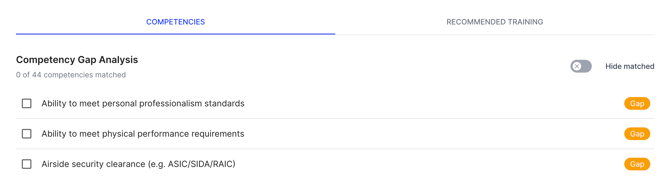
- Competencies Matched: how many required competencies you currently meet, for example 0/44
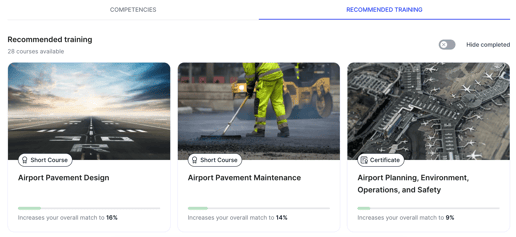
- Training: how many recommended courses you've completed, for example 1/28 (4%)

Competencies
- The Competency Gap Analysis lists every competency the role requires.
- Anything you haven't matched yet is marked as a Gap.
- Turn on Hide matched to only see what is outstanding.
Recommended Training
- Lists the courses available to help you close your gaps, along with how many are available in total.
- Turn on Hide completed to see only what is left to do.
- Select a course to view its details, including price and time to complete, and Buy for myself if you want to enrol.
Close a gap directly from your benchmark
- Open the Competencies tab.
- Find a competency marked Gap.
- Select it to open Add Skill, pre-filled with that competency's description (see add skills to your passport).
- Complete the details and select Add to Skills Passport.
Your benchmark updates automatically as you add skills or complete recommended training, so you can track your progress toward the role over time.