---
title: Your airport in Klayo
description: Learn how connecting your airport or organization to Klayo affects what's free and what needs a purchase.
---
[Skip to content](https://help.klayo.com/your-airport-in-klayo-free-vs-paid#main-content)
[](https://help.klayo.com/)
Open main navigation
Close main navigation
- [Contact Support](https://klayo.com/about#contact)
[Contact Support](https://klayo.com/about#contact)
How can we help you?
- There are no suggestions because the search field is empty.
1. [Knowledge Base | Klayo](https://help.klayo.com/)
2. [Get started](https://help.klayo.com/get-started)
3. [Your account](https://help.klayo.com/get-started#your-account)
# Your airport in Klayo
## Connect to your airport
---
### Before you start
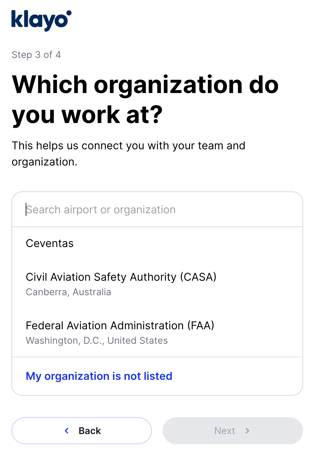
If you're unsure whether your airport already has a Klayo account, search for the airport first: only select **My organization is not listed** when it doesn't appear.
---
When you set up your account, Klayo asks which airport or organization you work at. This connects you to your organization's account in Klayo and determines what's already available to you at no extra cost.
1. During sign-up, search for your airport or organization by name.
2. Select it from the list if it appears: for example, your airport authority or a recognized body like **Civil Aviation Safety Authority (CASA)** or the **Federal Aviation Administration (FAA)**.
3. If your organization isn't listed, select **My organization is not listed** and continue on to select your **Country**.
4. Select **Get started**.
### **What this affects:**
- If your organization is already on Klayo, they may give you access to courses and careers at no cost to you. Contact your Klayo administrator to check what's included.
- If your organization isn't yet on Klayo, you can still create a personal account: your Skills Passport, Course Catalogue browsing, and Careers browsing remain free, but purchasing a career or unlocking Career Planning would be at the individual rate shown on the pricing page.
- [Get started](https://help.klayo.com/get-started#main-content)
- [Your account](https://help.klayo.com/get-started#your-account)
- [Free vs paid](https://help.klayo.com/get-started#free-vs-paid)
- [Learning & Courses](https://help.klayo.com/learning-courses#main-content)
- [Access training](https://help.klayo.com/learning-courses#access-training)
- [Complete a course](https://help.klayo.com/learning-courses#complete-a-course)
- [Your Career](https://help.klayo.com/your-career#main-content)
- [Skills Passport](https://help.klayo.com/your-career#skills-passport)
- [Career Explorer](https://help.klayo.com/your-career#career-explorer)
- [Managing People](https://help.klayo.com/managing-people#main-content)
- [Enrol students](https://help.klayo.com/managing-people#enrol-students)
- [Report](https://help.klayo.com/managing-people#report)
- [Pre-paid accounts](https://help.klayo.com/managing-people#pre-paid-accounts)
- [Workforce Solutions](https://help.klayo.com/workforce-solutions)
- [Accounts, Seats & Billing](https://help.klayo.com/accounts-seats-billing)
[](http://klayo.com)
Copyright © 2026, Ceventas Pty Ltd