---
title: Navigate My Klayo (free seat)
description: A guide to the (free version) My Klayo menu and tabs, including My Courses, Course Catalogue, Careers, and Skills Passport.
---
[Skip to content](https://help.klayo.com/navigate-my-klayo-free-version#main-content)
[](https://help.klayo.com/)
Open main navigation
Close main navigation
- [Contact Support](https://klayo.com/about#contact)
[Contact Support](https://klayo.com/about#contact)
How can we help you?
- There are no suggestions because the search field is empty.
1. [Knowledge Base | Klayo](https://help.klayo.com/)
2. [Get started](https://help.klayo.com/get-started)
3. [Your account](https://help.klayo.com/get-started#your-account)
# Navigate My Klayo (free seat)
## Discover My Klayo and its features.
---
Once your account has been activated, everything lives under **My Klayo**.
### **1. Left-hand menu:**
- **My Klayo**: your homepage
%20-%20navigation%20menu.png?width=367&height=176&name=My%20Klayo%20(free)%20-%20navigation%20menu.png)
### **2. Top tabs**
- **My Courses:**
- See, start, and resume courses you're enrolled in.
- Access certificates for courses you have completed.
- New here? Select **Browse courses** to find training that matches your goals.
- **Course Catalogue:**
- Browse the Online Learning Centre's catalogue of 200+ ACI-accredited online courses.
- Discover **Recommended for you** based on your current role.
- **Careers:**
- [Set your **Current role** and your **Career goal**](https://help.klayo.com/use-the-role-and-career-selector).
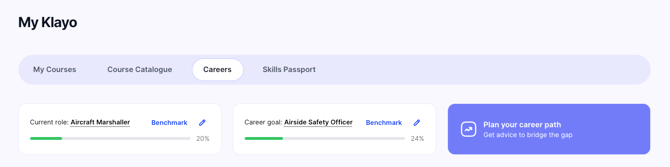
Your **Current role** and progress toward your **Career goal** are shown at the top of both the Careers and Skills Passport tabs.
- - [Explore airport jobs](https://help.klayo.com/explore-careers) and see how your competencies match against any job.
- **Skills Passport:**
- Store and manage your certifications, licences, experience, and skills.
- Badges will be automatically added for any online course you complete
- Select which competencies to display on your public profile
- Access your **Public Profile **
- [Learn more about how to use the Skills Passport](https://help.klayo.com/build-your-skills-passport)
- [Get started](https://help.klayo.com/get-started#main-content)
- [Your account](https://help.klayo.com/get-started#your-account)
- [Free vs paid](https://help.klayo.com/get-started#free-vs-paid)
- [Learning & Courses](https://help.klayo.com/learning-courses#main-content)
- [Access training](https://help.klayo.com/learning-courses#access-training)
- [Complete a course](https://help.klayo.com/learning-courses#complete-a-course)
- [Your Career](https://help.klayo.com/your-career#main-content)
- [Skills Passport](https://help.klayo.com/your-career#skills-passport)
- [Career Explorer](https://help.klayo.com/your-career#career-explorer)
- [Managing People](https://help.klayo.com/managing-people#main-content)
- [Enrol students](https://help.klayo.com/managing-people#enrol-students)
- [Report](https://help.klayo.com/managing-people#report)
- [Pre-paid accounts](https://help.klayo.com/managing-people#pre-paid-accounts)
- [Workforce Solutions](https://help.klayo.com/workforce-solutions)
- [Accounts, Seats & Billing](https://help.klayo.com/accounts-seats-billing)
[](http://klayo.com)
Copyright © 2026, Ceventas Pty Ltd