---
title: Check your training balance
description: See how much prepaid training credit your organization has available and what it can be used for.
---
[Skip to content](https://help.klayo.com/check-your-training-balance#main-content)
[](https://help.klayo.com/)
Open main navigation
Close main navigation
- [Contact Support](https://klayo.com/about#contact)
[Contact Support](https://klayo.com/about#contact)
How can we help you?
- There are no suggestions because the search field is empty.
1. [Knowledge Base | Klayo](https://help.klayo.com/)
2. [Managing People](https://help.klayo.com/managing-people)
3. [Pre-paid accounts](https://help.klayo.com/managing-people#pre-paid-accounts)
# Check your training balance
## See your available prepaid training credit and what it can be used for.
---
### Before you start
You'll need Training Manager permissions.
---
### Check your balance
1. In the left menu, select **Manage**, then **Training**.
2. Your **Balance** is shown at the top of the page, next to the Training heading.
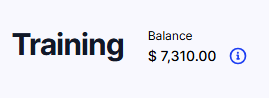
3. Select the information icon next to the balance to see what your training balance can be used for.
### What your balance can be used for
Your prepaid balance lets you enrol your students in training courses, including enroling several at once. A prepaid balance is paid for by an individual, and generally only that person can use it.
Prepaid balances are valid for 12 months from the date they're purchased.
A prepaid balance can be scoped to one or more training managers, to one or more courses, or to a combination of both. Each balance is named individually, so if you have more than one, the names help you tell them apart and see what each is for. A balance restricted to a particular set of courses might be given a name that reflects those courses, for example.
### Need more credit?
If you need to top up your balance, select **Contact Support** from the balance information window to discuss your training needs.
---
- [Get started](https://help.klayo.com/get-started#main-content)
- [Your account](https://help.klayo.com/get-started#your-account)
- [Free vs paid](https://help.klayo.com/get-started#free-vs-paid)
- [Learning & Courses](https://help.klayo.com/learning-courses#main-content)
- [Access training](https://help.klayo.com/learning-courses#access-training)
- [Complete a course](https://help.klayo.com/learning-courses#complete-a-course)
- [Your Career](https://help.klayo.com/your-career#main-content)
- [Skills Passport](https://help.klayo.com/your-career#skills-passport)
- [Career Explorer](https://help.klayo.com/your-career#career-explorer)
- [Managing People](https://help.klayo.com/managing-people#main-content)
- [Enrol students](https://help.klayo.com/managing-people#enrol-students)
- [Report](https://help.klayo.com/managing-people#report)
- [Pre-paid accounts](https://help.klayo.com/managing-people#pre-paid-accounts)
- [Workforce Solutions](https://help.klayo.com/workforce-solutions)
- [Accounts, Seats & Billing](https://help.klayo.com/accounts-seats-billing)
[](http://klayo.com)
Copyright © 2026, Ceventas Pty Ltd