---
title: Build a job
description: How to build a job with Klayo Intelligence, from a job description or from scratch.
---
[Skip to content](https://help.klayo.com/build-a-job#main-content)
[](https://help.klayo.com/)
Open main navigation
Close main navigation
- [Contact Support](https://klayo.com/about#contact)
[Contact Support](https://klayo.com/about#contact)
How can we help you?
- There are no suggestions because the search field is empty.
1. [Knowledge Base | Klayo](https://help.klayo.com/)
2. [Workforce Solutions](https://help.klayo.com/workforce-solutions)
# Build a job
## Easily and quickly build industry-standard job profiles
---
### Before you start
You need Admin access to build a job, and the Jobs feature needs to be enabled for your organization.
If you see a message saying the feature isn't available, [contact us](https://klayo.com/about#contact) to turn it on.
---
If you have Admin access, you can build a custom job profile for your organization, either by matching to an industry-standard role, uploading a job description, or building one from scratch.
Once built, a job's tasks, competencies, and training become the benchmark your team is measured against.
### Go to Jobs
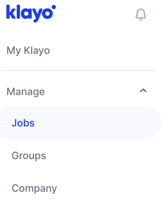
1. In the left menu, select **Manage**, then **Jobs**.
2. Select **New job**.
### Choose how to start
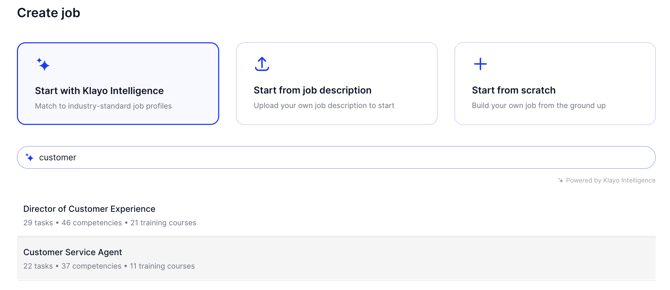
- **Start with Klayo Intelligence:** search for a job title and match it to an industry-standard profile, complete with tasks, competencies, and training already mapped.
- **Start from job description:** upload your own job description as a PDF (up to 10 MB) and let Klayo build the job from it.
- **Start from scratch:** build the job yourself, step by step.
### Start with Klayo Intelligence
1. Select **Start with Klayo Intelligence**.
2. Search for the job title, for example "customer".
3. Review the matches. Each shows how many tasks, competencies, and training courses it includes.
4. Select the closest match to open its **Job details**.
5. Review the **Job description**, and select **Show tasks**, **Show competencies**, or **Show training** to see what's included and how many are currently selected.
6. Select **Import job** to add it to your organization, or use the dropdown next to it for other import options.
### Start from a job description
1. Select **Start from job description**.
2. Select **Click to upload**, or drag and drop your job description as a PDF (up to 10 MB).
3. Review and import the job as above.
### Start from scratch
1. Select **Start from scratch**, then **Continue**.
2. **Step 1, Job details:** enter the **Job title** (required), a **Job description**, and a **Domain** if relevant. Turn on **Enable Job Matching for this job** if you want it available for benchmarking and job matching.
3. Select **Continue**.
4. **Step 2, Tasks:** add the tasks the role involves.
5. **Step 3, Competencies:** add the competencies the role requires.
6. Save the job once you're done.
Once a job is built, it becomes available across Klayo for your organization, including in Careers, Benchmarking, and Job Matching.
You'll also find a **Benchmark job** option on the Jobs list, which lets you run a quick competency benchmark for a role without building a full job profile first.
- [Get started](https://help.klayo.com/get-started#main-content)
- [Your account](https://help.klayo.com/get-started#your-account)
- [Free vs paid](https://help.klayo.com/get-started#free-vs-paid)
- [Learning & Courses](https://help.klayo.com/learning-courses#main-content)
- [Access training](https://help.klayo.com/learning-courses#access-training)
- [Complete a course](https://help.klayo.com/learning-courses#complete-a-course)
- [Your Career](https://help.klayo.com/your-career#main-content)
- [Skills Passport](https://help.klayo.com/your-career#skills-passport)
- [Career Explorer](https://help.klayo.com/your-career#career-explorer)
- [Managing People](https://help.klayo.com/managing-people#main-content)
- [Enrol students](https://help.klayo.com/managing-people#enrol-students)
- [Report](https://help.klayo.com/managing-people#report)
- [Pre-paid accounts](https://help.klayo.com/managing-people#pre-paid-accounts)
- [Workforce Solutions](https://help.klayo.com/workforce-solutions)
- [Accounts, Seats & Billing](https://help.klayo.com/accounts-seats-billing)
[](http://klayo.com)
Copyright © 2026, Ceventas Pty Ltd